> For the complete documentation index, see [llms.txt](https://manual.unosofbooks.com/llms.txt). Markdown versions of documentation pages are available by appending `.md` to page URLs; this page is available as [Markdown](https://manual.unosofbooks.com/accounting/sri-electronic-transfer/sri-cases.md).
# SRI Cases
This page explains different cases when you are not able to send or authorize a document (invoice, guide, credit or debit note)
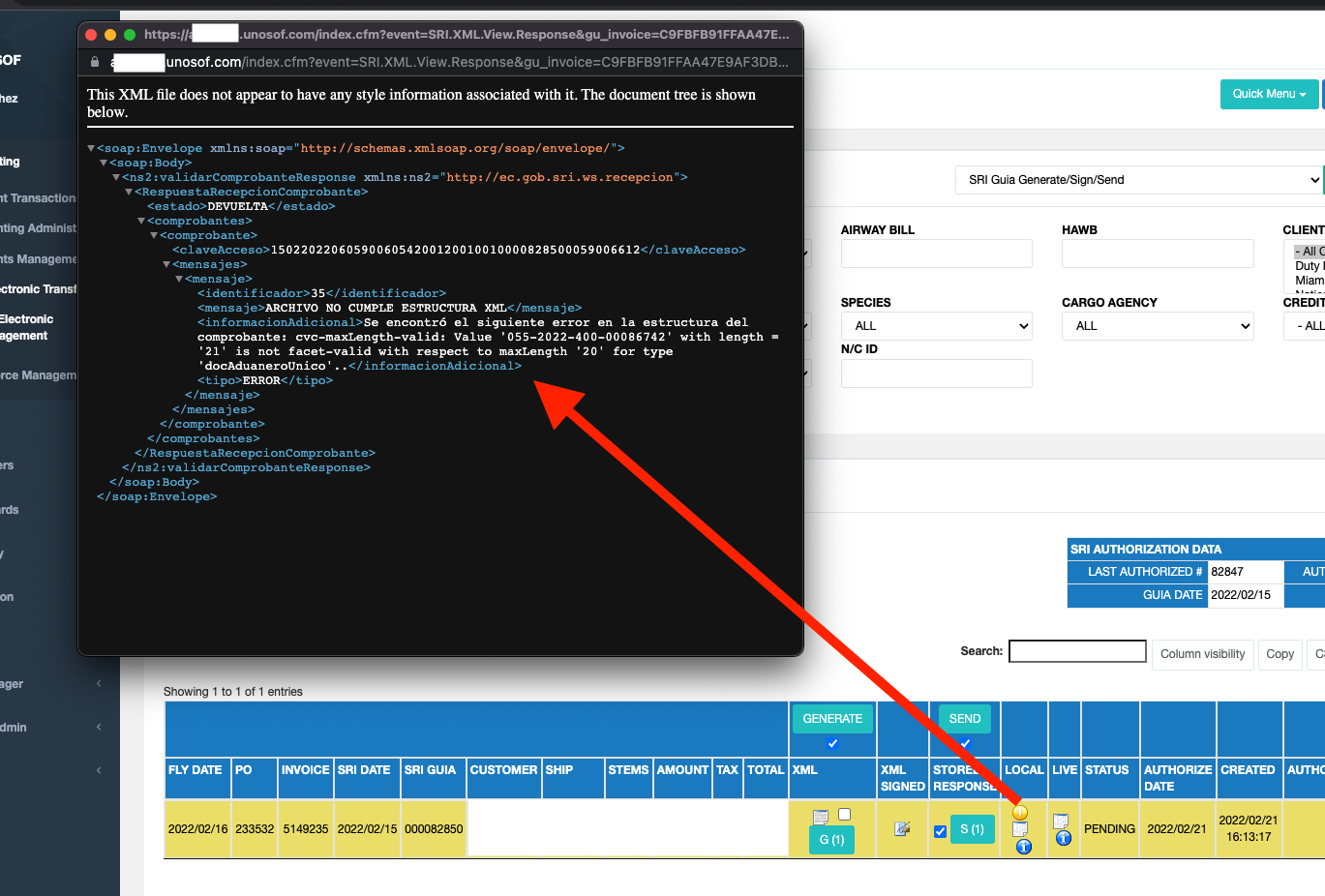
### docAduaneroUnico
This error pops up when the DAE, AWB, HAWB is not saved in that purchase order, it must be checked on the coordination page if the data is correctly entered.
If any data is missing, it can be entered by [PRE-AUTHORIZATIONS MODIFICATIONS](/accounting/sri-electronic-transfer/sri-electronic-management/pre-authorization-modifications.md), or the SRI DATA column of each SRI FACTURA in the SRI module.
### docCustomsUnique - is not facet-valid with respect to maxLength '20' for type 'docCustomsUnique'
This means that the SRI accepts only a maximum of up to 20 characters in that field, in the case of the example there are 21 characters.
* The DAE must be corrected in the system
* Regenerate the XML file and resubmit
### Limite de Intentos NO AUTORIZADOS POR DIA
When there is an error in a document, and we have not corrected yet, and it has been sent for authorization more than twice before the correction, a 24-hour block prevent us from trying to authorize the document again.
In this case, we must wait to send the same document for authorization again ( detects the consecutive number and the password)
Error message example:
*"LIMIT OF UNAUTHORIZED ATTEMPTS PER DAY The access key 0701202201019013194700120010030000498131234567811 has exceeded the daily limit allowed for an unauthorized voucher (2 attempts), for the date: Tue Jan 11 15:40:29 GMT-05:00 2022. Correct the errors and try again the next day"*
### tipoIdentificacionComprador
This error occurs because the SRI IDENTIFICATION, which is found in the ACCOUNTING tab of the manage clients form, is not specified in the form.
RUC, CEDULA, Passport, Foreign Identification, Final Consumer Sale **must always be selected .**
### Error en Diferencia
When the calculated values do not coincide with the values reported in the XML, a difference error occurs, in which the total of the order plus freight (if any) is not equal to what the XML contains.
In these cases, it commonly occurs because the species is not assigned in the SKU of that order, or if the SKU has more than 1 compound, it may be that there are fewer or more stems in the compound and at the time of calculation the sum does not match.
## Error Lugar INCOTERM
This error occurs if a PO has been billed without information of **AWB**, **HAWB** or **DAE** of that information the COUNTRY, Airport cannot be determined.
{% hint style="info" %}
*"FILE DOES NOT MEET XML STRUCTURE The following error was found in the receipt structure: cvc-minLength-valid: Value '' with length = '0' is not facet-valid with respect to minLength '1' for type 'lugarIncoTerm'..."*
{% endhint %}
Example:
To solve it can be done through: SRI DATA, filling in the fields one by one, and press the SAVE SRI button.
### DETAILS, the details content is not complete
{% hint style="info" %}
*"Se encontro el siguiente error en la estructura del comprobante: cvccomplex-type.2.4.b: The content of element 'detalles' is not complete. One of '{detalle}' is expected..."*
{% endhint %}
This error occurs when one or more SKUs of that order do not have a species defined in the SKU configuration.
.png?alt=media&token=4dd89ffc-1226-4b09-9c59-0168b9bb1dde)
.png?alt=media&token=03eecb0e-9446-4d41-a9d0-15bb4178af78)
.png?alt=media&token=50a7e034-84bf-4f73-973c-926985dd7d7f)
.png?alt=media&token=1ed4a237-12ef-45cd-a724-d105d4ce77ee)
.png?alt=media&token=30087143-3842-4ad3-b16d-af56414b26a8)
.png?alt=media&token=1021bb7e-6b14-49b2-914d-0e8931278643)
.png?alt=media&token=d18231de-7af6-4625-840b-a41f60f587a5)
.png?alt=media&token=0c1cdd77-a3f5-48b8-8880-1b8d81cd733d)
.png?alt=media&token=9c97201c-58f7-4f46-8268-d0bfd4826bec)