> For the complete documentation index, see [llms.txt](https://manual.unosofbooks.com/llms.txt). Markdown versions of documentation pages are available by appending `.md` to page URLs; this page is available as [Markdown](https://manual.unosofbooks.com/site-manager/select-options.md).
# Select Options
In this module, its possible to find the GU ID's of each table we manage.
## Cut-stage GU ID
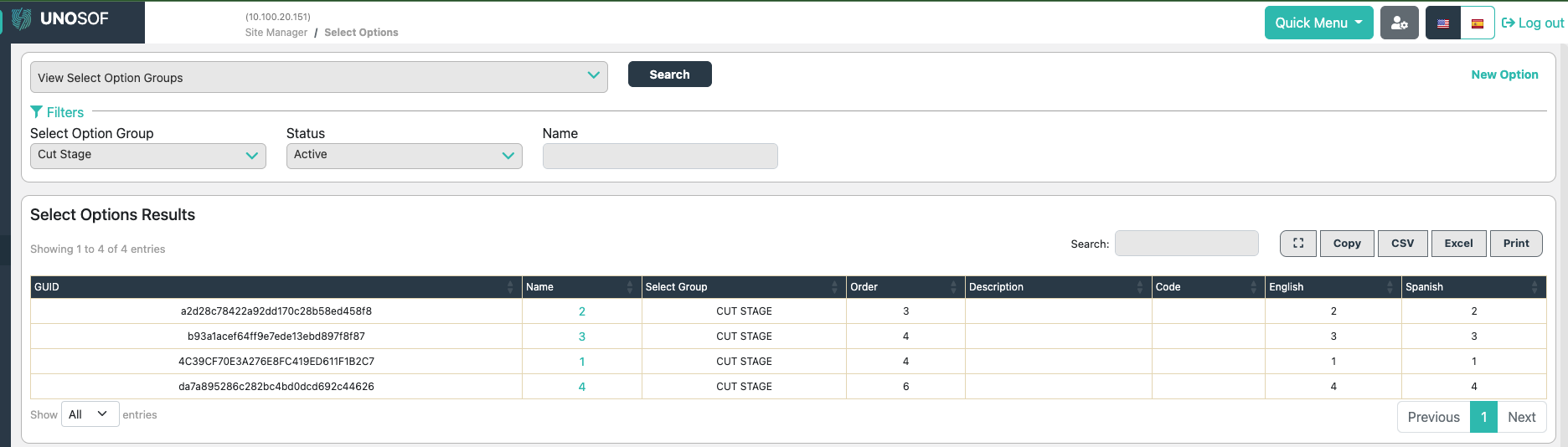
Please select in the filters, **select option group**, the cut stage option, and hit **search**. A list shall display that shows all the cutstages been created in your database. The column **NAME**, is how the custages are named. \
\
This module is very useful to copy a GU ID of the name you'd like to default at in the PO page and S2 module.
Cut Stage ID's
Custage name, and Custage GU ID.
Copy the GU ID and go to the module [Properties](/system-administration/properties.md) to insert that code to default at.